I’ve coined terms before. Never blogged about them — they were just things that needed a name because they didn’t have one yet. That’s where I am with this.
Every software discipline has a lifecycle. The SDLC — plan, design, build, test, deploy, maintain — has been the backbone of software delivery for decades. It has evolved through waterfall, agile, and DevOps, but the shape remains consistent: a structured loop that converts intent into working software.
When AI agents become part of that delivery chain, the loop doesn’t disappear. It gains a new layer alongside it — one that determines how well the agents inside it will actually perform. A layer you don’t just execute. You calibrate.
I’m calling this the ADLC — the Agent Development Lifecycle.
If you’ve been hunting for a reliable AI agent workflow — something sturdier than hoping today’s prompt works as well as yesterday’s — this is the lifecycle that answers it.
Not a replacement for the SDLC. An extension of it. Where the SDLC asks “did we ship the right software?”, the ADLC asks “are the agents helping us ship it producing what we actually need?” The unit of iteration is no longer the feature. It’s the instruction.
The Shift: From Delivery to Calibration
In the SDLC, the loop is:
Plan → Build → Test → Release → Feedback → Plan
The output is working software. The measure is: does it meet the acceptance criteria?
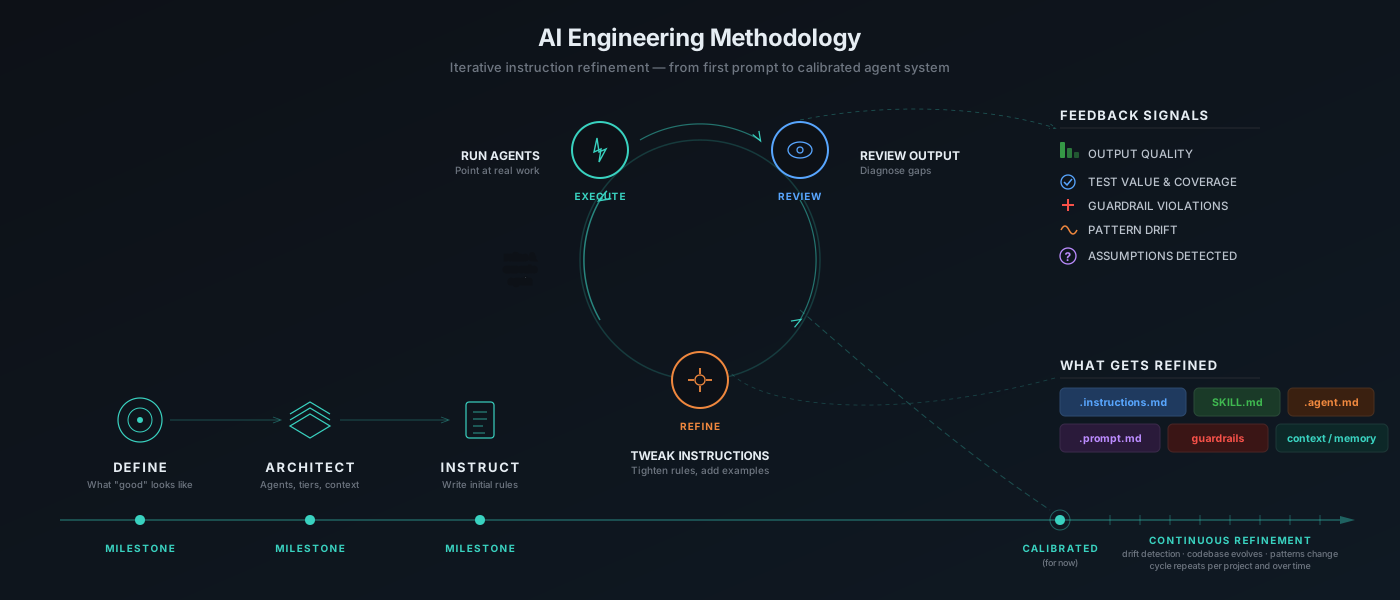
In the ADLC, a second loop runs alongside it. First, there’s a one-time bootstrap:
Define → Architect → Instruct
This happens once. You define what “good” looks like, architect the system, then write the initial instructions.
Then the calibration loop runs repeatedly:
Execute → Review → Refine → Execute
This is the ongoing cycle. Point agents at work, observe output, refine instructions, run again. Instruct only changes when you deliberately refine it — not per execution.
The output is calibrated agent behaviour. The measure is: does the agent consistently produce the right kind of output — secure, tested, following the patterns you expect — without you having to babysit every prompt?
The Phases
Bootstrap (One-Time Setup)
I. Define — What Are You Solving For?
Before touching a single instruction file, you need clarity on what “good” looks like. This mirrors the Discovery or Definition phase of any software lifecycle — but the target is agent behaviour, not a product backlog:
- What types of tests should the agent produce? (unit, integration, API, E2E)
- What patterns must the code follow? (naming conventions, project structure, error handling)
- What guardrails are non-negotiable? (security, performance, code review standards)
- What does the agent not know that it needs to? (domain logic, team conventions, infrastructure constraints)
If you skip this, you’ll spend weeks refining instructions toward a target you haven’t defined.
II. Architect — Design the System
A single general-purpose agent doing everything sounds simpler. It isn’t. When we started using AI on a prior engagement, the pattern was: open chat, ask a question, get code. It worked for small tasks. The moment we tried to use it for real feature development — requirements analysis, architecture, implementation, testing, code review — everything fell apart.
A single agent trying to do everything is like a one-person startup being CEO, developer, QA engineer, and product manager simultaneously. Context dilutes. Quality inconsistencies compound. The agent forgets conventions it followed perfectly ten minutes ago.
The architectural answer is specialists, not generalists:
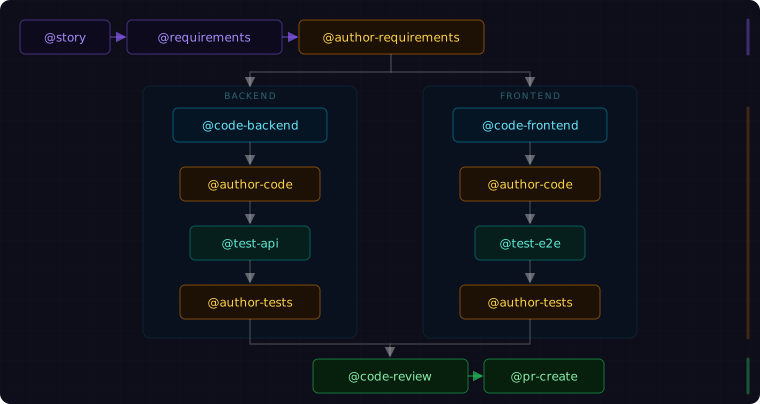
This mirrors how high-performing engineering teams actually work.
Model selection follows from this. Once you have specialists, you match models to jobs: orchestrators need deep reasoning (Claude Opus), implementers need speed and throughput (Claude Sonnet), structured formatting tasks need neither (GPT-5.4 mini). A generalist architecture forces one model for everything. A specialist architecture lets you right-size cognitive load to capability.
Calibration Loop (Repeating Cycle)
III. Instruct — Write the Rules
This is where the AI engineer’s craft lives. You’re authoring the system of files that governs agent behaviour. This step replaces the bootstrap — once you’ve instructed, you come back here only when you refine.
| Artifact | Purpose | Loaded when |
|---|---|---|
.instructions.md | Language/framework conventions — naming, structure, error handling | Automatically, scoped by file type via applyTo glob |
SKILL.md | Deep domain knowledge — endpoint patterns, test strategy, PR checklists | On demand, when task domain matches |
scripts/ | Deterministic operations — branch validation, pattern scanning, drift checks | When the answer needs computation, not prose |
.agent.md | Agent identity, tool scope, model selection, handoff definitions | Agent initialisation |
memory bank | Persistent context — ADO project info, story plans, feature designs, architectural decisions | Cross-session, read by agents that need it |
The key insight: you’re writing specifications, not code. But unlike human specs, these need to be far more deterministic. AI doesn’t have past experience to draw from. It won’t ask clarifying questions. It will fill gaps with assumptions and deliver the result with full confidence.
Every ambiguity in your instructions is a place where the agent will make a choice you didn’t intend.
Tool scoping is the most important design decision you’ll make. The .agent.md file doesn’t just define what an agent does — it defines what it can do. @code-review has read tools only. It cannot edit files. Period. This isn’t a limitation; it’s a guarantee. When a reviewer tells you something is wrong, you know it won’t “helpfully” fix your code in ways you didn’t approve.
@requirements has no code-editing tools. It talks to ADO, reads wikis, asks questions. It cannot accidentally implement something while analysing a story. @code-backend has edit and terminal access — because its job is to produce code. But it has no ADO write access for work items. It implements; it doesn’t redefine scope.
Unrestricted tool access is how you get an agent that “fixes” a bug by silently changing your test assertions to match the broken behaviour. Scoping tools is how you prevent entire categories of failure. Constraints are features.
Skills are shared across agents. A pr-review-csharp skill is used by both @code-review (for human-facing reviews) and @author-code (for machine-facing quality gates). Same knowledge, different contexts. Write once, enforce everywhere. This is also why skills need drift detection — when the codebase evolves and you don’t update the skills, every agent propagates the stale knowledge with equal confidence.
Handoff definitions are the connective tissue. Agents don’t exist in isolation. When @code-backend finishes, its .agent.md surfaces next-step handoffs: “Generate Integration Tests → @test-api” or “Send to Code Review → @code-review.” Clicking one transfers context to the next agent automatically. This replaces the workflow where you copy output from one chat, open another, paste it in, and hope you didn’t lose anything. Handoffs encode which transitions are valid and what context each agent needs to receive.
IV. Execute — Run the Agents
Point the agents at real work and let them run. This isn’t a test — it’s a diagnostic. You’re not evaluating the deliverable, you’re evaluating the system that produced it.
Before implementation begins, there’s a clarity gate: a pre-flight check that validates the story has specific AC, defined scope, and no missing auth or security requirements. If not, the orchestrator surfaces a warning and offers a handoff to @requirements for refinement. You can proceed with documented assumptions — but you’re making that choice explicitly, with the gaps recorded. No accidental optimism.
Watch for:
- Did the agent ask the right questions, or did it assume?
- Did it follow the patterns you specified, or invent its own?
- Did it create valuable tests, or just a lot of them?
- Did it handle edge cases, or only the happy path?
- Did it stay within its scope, or bleed into areas another agent owns?
V. Review — Read the Output Like a Spec Failure
This is the quality engineering muscle. You’re not reviewing the code the way you’d review a junior developer’s PR. You’re reviewing it as evidence of instruction quality.
When an agent produces a bad test, the question isn’t “why did the agent write a bad test?” — it’s “what was missing or ambiguous in my instructions that led to this?”
Common failure patterns:
Volume over value — the agent writes 40 tests for a CRUD endpoint. Most are trivial. None test the business rule that actually matters. Your SKILL.md probably didn’t specify what to test, only that to test.
Assumption-driven logic — the agent made a design decision you didn’t authorise. Your instructions were high-level enough for a human to interpret correctly, but too vague for AI. It filled the gap with a plausible assumption and never told you.
Pattern drift — the first three files the agent produced followed your conventions perfectly. The fourth drifted. Context window filled up, or the instruction wasn’t reinforced strongly enough.
Confident garbage — the code compiles, the tests pass, and the PR description reads beautifully. But the implementation is wrong in a way that’s hard to catch without domain knowledge the agent doesn’t have.
The author agent pattern automates this layer. Between each implementation phase and the next, a dedicated author agent reviews the output and produces a machine-readable verdict: rating (1–5), confidence level, specific findings with evidence, and a routing recommendation. The orchestrator reads this structured output and acts on it — advance, retry, or escalate to a human. Author agents are not the same as @code-review, which produces human-readable reports. Author agents produce output another agent can parse and act on autonomously.
| Rating | Meaning | Routing |
|---|---|---|
| 4–5 | Meets the bar | Advance to next phase |
| 2–3 | Gaps — missing edge cases, no negative tests | Retry (max 2 attempts) |
| 1 | Fundamental issue — vague scope, wrong domain | Escalate to human |
A rating of 1 is not a retry. Some problems can’t be fixed by trying harder.
VI. Refine — Tighten the Instructions
Based on what you observed, update the instruction files. This isn’t “fixing a bug” — it’s calibrating the system. Small, precise changes:
- Add a specific example to the SKILL.md showing what a valuable test looks like vs. a trivial one
- Add a guardrail that rejects tests without at least one business-logic assertion
- Make the
.instructions.mdmore prescriptive about error handling patterns - Tighten the author agent’s rating rubric so it catches the pattern you just saw slip through
- Add context to the memory bank about domain rules the agent can’t infer from code alone
Then run it again. Same work, updated instructions. Did the output improve?
Constraints Are Features
This deserves its own emphasis because it’s counter-intuitive.
Every restriction we added — tool scoping, read-only agents, structured output contracts, handoff validation — improved reliability. We expected constraints to limit what agents could do. What we found was that constraints converted unpredictable surprises into predictable guarantees.
Agents with unlimited power will surprise you. Agents with scoped tools, bounded context, and structured handoffs behave consistently. The constraint is the feature.
Human at the Right Altitude
The system is not fully autonomous, and it shouldn’t be.
We don’t ask humans to approve every file edit. We ask them to approve phase transitions: “Requirements look good? Proceed to implementation.” “Implementation done — start testing?” “Tests pass review — open the PR?”
Between those checkpoints, agents handle the mechanics. Naming conventions. Test scaffolding. Review checklists. Convention adherence. The things that are tedious, repetitive, and rule-based. Humans handle direction, not execution.
This is the right division: AI handles the parts of development where following rules correctly is most of the job. Humans handle the parts where judgment, domain knowledge, and accountability matter.
The Feedback Signals
Just as the SDLC tracks velocity, burndown, and release cadence, the ADLC needs its own signals to know whether calibration is converging:
| Signal | What it tells you |
|---|---|
| First-pass approval rate | How often does author agent output advance on the first attempt? Trending up = instructions improving |
| Retry rate | How many rating 2–3 decisions trigger a retry cycle? High = instructions too loose |
| Escalation rate | How often does a rating-1 reach a human? Should be rare — signals fundamental instruction gaps |
| Test value ratio | Tests with at least one business-logic assertion vs. trivial assertions. Low ratio = SKILL.md needs examples |
| Pattern drift occurrences | Conventions violated across a session. High = instructions not reinforced strongly enough |
| Skill phantom references | Code examples in skills that reference types or paths that no longer exist. Non-zero = drift detection not running |
Track these over time. They tell you whether refinement is converging — and where to look when it isn’t.
This Is the ADLC
In the SDLC, teams ship working software each sprint or release cycle. Quality comes from process: code review gates, test suites, deployment pipelines.
In the ADLC, quality comes from instruction refinement. You’re not just shipping software — you’re shipping a better-calibrated agent system each cycle, one that produces more reliable, more secure, more consistent output with each iteration.
Two things we didn’t expect going in: orchestration is harder than implementation — the handoff protocols, verdict contracts, and routing logic are where the real complexity lives, not the individual agents. And skills beat prompts — a 200-line base prompt that loads 1,800 lines of domain knowledge on demand is more reliable than a 2,000-line prompt every time.
The job expands. You still write code. You still review PRs. But an increasing share of what you do is designing agents, authoring instructions, reviewing output as evidence of instruction quality, and tightening the rules that govern what the agents produce.
The SDLC ships software. The ADLC ships a better system for shipping it. Run them in parallel.
Related deep dives: Specialists vs Generalists · Skills, Instructions & Scripts · 4-Tier Context Architecture · Author Agents & Auto Mode · Drift Detection · Model Selection